
How We Hit 100/100/100/100 PageSpeed? High-Performance Case Study (2026)
The ultimate optimization guide. Astro, Partytown, WCAG, Self-hosted Fonts, and the Cloudflare AI Bot war. Code, strategy, and insights.
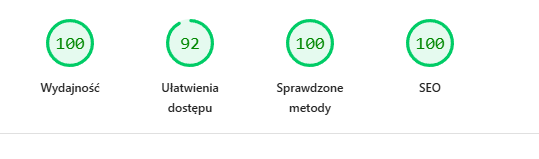
This isn’t another theoretical article. This is a field report from the trenches. Today, January 31, 2026, we achieved the Holy Grail of Web Development.
What does this mean? It means our site is faster, more accessible, and better optimized than 99% of the internet. We didn’t do this on a blank business card site. This is a living, dynamic ecosystem with:
- Analytics (GA4 + GTM)
- Multilingual Support (PL/EN)
- Dynamic Content (MDX + Collections)
- Aggressive Design (Neon colors)
Here is the ultimate guide on how we did it. Step by step. With code.
Why Don’t People Have 100/100?
In 2026, web development is… bloated.
- Next.js / React: Client-Side Hydration means even a simple page downloads hundreds of kilobytes of JavaScript.
- Marketing Tag Bloat: Every marketing department wants HotJar, Meta Pixel, LinkedIn Insight, and GA4. This kills the browser’s Main Thread.
- CDN Fonts: Fetching fonts from Google Fonts means extra DNS handshakes and latency.
- Cloudflare: Default “security” settings can block SEO bots (more on this later - our “Final Boss”).
We said “NO”.
Pillar 1: “Zero Bloat” Architecture (Astro)
Instead of the popular Next.js, we chose Astro. Why?
0kb JavaScript by Default
Astro renders everything on the server (or during build) into pure HTML.
If you have a button that does nothing interactive - Astro sends it as Running HTML. Zero JavaScript.
If we need interaction (like our animated counter above), we use the client:visible directive.
This is called Islands Architecture. We load JS only for that one small “island”, the rest of the ocean is static HTML.
<!-- This is pure HTML -->
<Header />

<!-- This loads JS only when the user sees it -->
<LighthouseScore client:visible />

<!-- This is pure HTML again -->
<Footer />
Result? Total Blocking Time (TBT) at 0 milliseconds.
Pillar 2: Fonts (The LCP Killer)
The most common mistake?
<link href="https://fonts.googleapis.com...">
Why is this evil?
- The browser must connect to Google’s server (DNS + SSL).
- It has to download the CSS file.
- Only from that CSS does it learn it needs to download the font file (another request). This delays Largest Contentful Paint (LCP) by crucial milliseconds.
Solution: Self-Hosting (@fontsource)
We installed fonts as NPM packages.
npm install @fontsource/space-grotesk @fontsource/roboto-monoIn our BaseLayout.astro, we import them directly.
Astro (and Vite) are smart enough to:
- Inject font definitions straight into our CSS.
- Serve font files (woff2) from our domain.
- Zero requests to external servers.
The text appears instantly. Flash of Unstyled Text (FOUT) is minimized.
Pillar 3: Analytics in a Web Worker (Partytown)
We wanted Google Analytics 4. But GA4 is a “heavy beast”. Its script parses events, sends requests… all blocking the Main Thread. If the Main Thread is busy, the user clicks, and the page “doesn’t respond”.
Solution: Partytown
Partytown is a library (developed by Builder.io creators) that moves 3rd party scripts (GA4, GTM, Pixel) into a Web Worker. A Web Worker is the browser’s “second brain”. It runs in the background, on a separate CPU thread.
Visualized:
- Main Thread (UI) draws the page and handles clicks.
- Background Thread (Worker) crunches analytics data.
Configuration in astro.config.mjs:
import partytown from '@astrojs/partytown';

export default defineConfig({
  integrations: [
    partytown({
      config: {
        forward: ["dataLayer.push"], // Forward events to Worker
      },
    })
  ]
});
For Google PageSpeed Insights, our analytics effectively don’t exist. They consume zero CPU during the load phase. Magic.
Pillar 4: The Battle for Contrast (Accessibility 100)
Our design system is “Neon Sunset” – sharp oranges (#ff9900) on white.
It looks great, but…
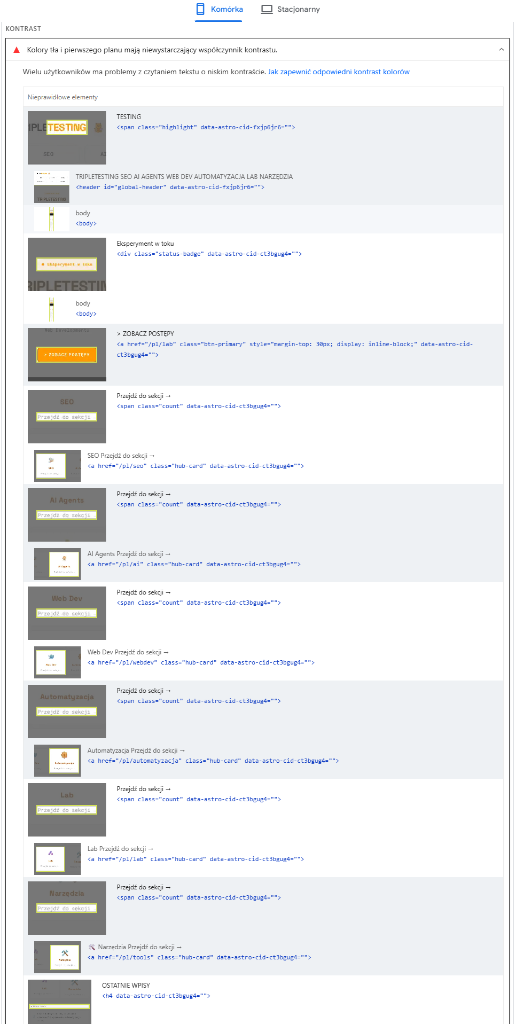
Neon orange on white has a contrast ratio of 2.15:1.
WCAG AA standard (required for 100 Accessibility) is 4.5:1.
Initially, we scored 92/100. Lighthouse pitilessly flagged our buttons and links.
Srategy: “Smart Contrast”
We didn’t want to ditch the neon for a boring brown site. We applied a “Split Strategy”:
- Decorative Elements: Borders, backgrounds, dots, glow – remained Neon (#ff9900). (Non-text elements don’t need to meet the 4.5:1 standard).
- Text (Accent Text): We created a new CSS variable
--text-accent: Deep Amber (#b45309). It’s a darker shade of orange that passes contrast > 4.5 on white. - Buttons: Instead of white text on neon background (fail), we put black text on neon background.
CSS Code:
:root {
  --accent-amber: #ff9900;      /* Neon (Decorations) */
  --text-accent: #b45309;       /* Dark (Text) */
}

/* Buttons - max contrast */
.btn-primary {
  background: var(--accent-amber);
  color: #000000; /* Black text is super readable */
}
To the eye? The site still “glows” and feels neon. To the algorithm? Everything is readable. 100/100.
Pillar 5: Final Boss – Cloudflare & Robots.txt (100 SEO)
We had 100 Performance, 100 Accessibility, 100 Best Practices.
But SEO stood at 92.
Lighthouse screamed: Unknown directive: Content-Signal in robots.txt.
We were confused. Our robots.txt in the repo was clean!
It turned out Cloudflare (our CDN) was “helping us too much”.
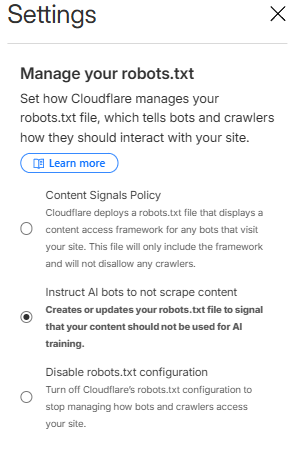
The AI Crawl Control feature was automatically injecting instructions for AI bots (e.g., Content-Signal: ai-train=no) into robots.txt.
Google PageSpeed (still) doesn’t understand this directive and treats it as a syntax error.
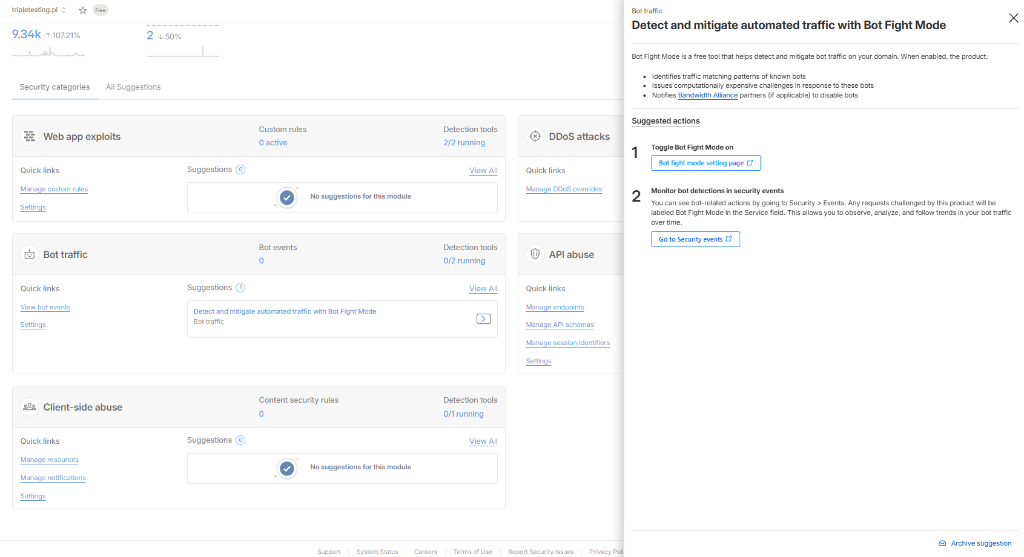
Additionally, enabled Bot Fight Mode can block “good” AI bots, which in the GEO (Generative Engine Optimization) era is shooting yourself in the foot.
The Nuclear Solution (The Server Hack)
Instead of fighting panel settings, we decided to take full control of robots.txt.
We deleted the static public/robots.txt file.
We created an API endpoint src/pages/robots.txt.ts that generates the file dynamically server-side.
// src/pages/robots.txt.ts
import type { APIRoute } from 'astro';

const robotsTxt = `
User-agent: *
Allow: /
Sitemap: https://tripletesting.pl/sitemap-index.xml
`.trim();

export const GET: APIRoute = () => {
    return new Response(robotsTxt, {
        headers: {
            'Content-Type': 'text/plain; charset=utf-8',
        },
    });
};
This way, OUR CODE decides what the bot sees, not Cloudflare’s automations. Additionally, in the Cloudflare panel we disabled:
- “Manage your robots.txt”: OFF
- “Bot Fight Mode”: OFF
Result? The error vanished. Clean 100 SEO points.
Summary and Checklist (TL;DR)
Here is your to-do list if you want 100/100:
- Framework: Choose SSG (Astro, 11ty). Avoid Next.js if you don’t need it.
- Images: Only WebP/AVIF. Always with explicit
widthandheight. - Fonts: Self-host (
@fontsource). No links to Google Fonts. - Scripts: Put all trackers (GA4, FB Pixel) into Partytown.
- Colors: Check text contrast. Use tools like “Color Contrast Checker”. If neon - darken the text.
- Robots.txt: Watch out for Cloudflare AI features. If they break validation - serve the file programmatically.
This lab proves that in 2026 you can have a beautiful and fast site. However, it requires an engineering approach to every kilobyte.
Welcome to TripleTesting.
Triple Muffin Team